
How to Choose the Right Weighbridge Indicator for Your Business?

When it comes to running an efficient weighing operation, most businesses focus heavily on the weighbridge structure and load cells. But there’s one component that quietly controls accuracy, data flow, and overall performance — the weighbridge indicator.
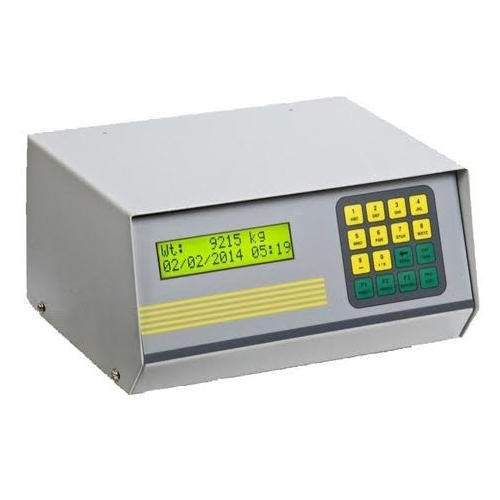
Choosing the right indicator isn’t just a technical decision. It directly impacts your daily operations, compliance, and long-term efficiency. If you pick the wrong one, you may face data errors, operational delays, or even compliance risks.
Let’s break it down in a simple, practical way so you can make the right choice for your business.
What is a Weighbridge Indicator?
A weighbridge indicator (also known as a weight indicator or terminal) is the brain of your weighing system. It receives signals from load cells, converts them into readable weight data, and displays it for operators.
Modern indicators do much more than just show weight. They can:
Store transaction data
Integrate with software systems
Generate reports
Support automation
Why Choosing the Right Indicator Matters?
A good indicator ensures:
Accurate weight readings
Smooth operations
Data transparency
Legal compliance
A poor choice can lead to:
Frequent errors
Downtime
Manual work overload
Compliance issues
Key Factors to Consider Before Choosing
1. Accuracy & Compliance
Accuracy is non-negotiable. Make sure the indicator:
Meets Legal Metrology standards
Supports calibration and verification
Provides stable readings even in harsh conditions
If your business is audited, your indicator must support compliance without complications.
2. Type of Application
Different industries have different needs. Ask yourself:
Are you in logistics, mining, cement, or agriculture?
Do you need simple weighing or advanced automation?
For example:
A small warehouse may need a basic indicator
A large industrial plant may require a programmable, network-enabled system
3. Connectivity & Integration
Today’s operations rely heavily on data. Your indicator should be able to connect with:
Weighbridge software
ERP systems
Printers and RFID devices
Look for connectivity options like:
RS232 / RS485
Ethernet
USB
Cloud integration
The more seamless the integration, the less manual work your team will have.
4. Data Management Capabilities
If you’re still writing weights manually, you’re losing time and accuracy.
Choose an indicator that can:
Store transaction records
Generate reports
Track vehicle entries/exits
Reduce manual data entry
Advanced indicators can even sync data in real time with centralized systems.
5. User Interface & Ease of Use
Your operators will be using this daily. A complicated system can slow down operations.
Look for:
Clear display (LED/LCD)
Simple navigation
Multilingual support (if required)
Easy training for staff
A user-friendly interface improves speed and reduces human errors.
6. Durability & Environment Suitability
Weighbridges often operate in tough environments:
Dust
Moisture
Extreme temperatures
Ensure your indicator:
Has a rugged build
Comes with proper IP rating (dust/water resistance)
Can handle voltage fluctuations
Durability means fewer breakdowns and lower maintenance costs.
7. Automation Features
If your business handles high volume, automation is a game changer.
Look for features like:
Automatic vehicle identification (RFID)
Barrier/gate control
Camera integration
Ticket printing
Automation reduces dependency on manual processes and increases efficiency.
8. Scalability
Your business will grow — your system should too.
Choose an indicator that:
Supports future upgrades
Can integrate with additional systems later
Doesn’t become obsolete quickly
A scalable solution saves you from reinvesting again in a few years.
Common Mistakes to Avoid
Many businesses make these mistakes while choosing an indicator:
Focusing only on price instead of features
Ignoring software compatibility
Not checking compliance requirements
Choosing overly complex systems for simple needs
Always balance cost, functionality, and future needs.
Basic vs Advanced Indicators: What Should You Choose?
Feature | Basic Indicator | Advanced Indicator |
Weight Display | ✔ | ✔ |
Data Storage | Limited | Extensive |
Software Integration | Minimal | Full |
Automation | ❌ | ✔ |
Best For | Small setups | Large operations |
Conclusion
Choosing the right weighbridge indicator is not just about buying a device — it’s about building a reliable weighing ecosystem.
The ideal indicator should:
Ensure accuracy
Support compliance
Simplify operations
Enable data-driven decisions
If you invest wisely, your indicator will not only improve efficiency but also become a critical part of your business growth.
KANTA KING
Website: https://www.kantaking.com/
Contact Us: +91.9560915555
Email: info@kantaking.com


I found the post about choosing the right weighbridge indicator really helpful, especially how it explained that the indicator controls accuracy and data flow in the system. I remember during a busy semester I was juggling tech topics and even looked for help with assignment to keep up with everything. It made me realize how picking the right tools, whether for study or business, can save a lot of stress later.